An AV control system is the hardware and software that lets people run every display, camera, microphone, speaker and switcher in a room from one touch panel. In enterprise environments the job is bigger than one room: your team has to keep hundreds or thousands of rooms working, across many hardware brands, and know what is happening in each of them. This guide explains how audio visual control systems work, how the way organisations manage AV technology is changing, and why audiovisual (AV) control is moving from room hardware to the cloud.
01 · Definition
What are AV control systems?
AV control systems let people operate the technology in a room without needing to learn about the complexity of the integrated system that makes it happen. Press "Start presentation" on the touch panel and the system powers on the display, switches to the laptop, sets the volume and lowers the blinds. The aim is ease of use: a user-friendly interface that anyone can operate with confidence, even if they are not technical.
Every AV control system is built from the same four parts.
The controller
Also called an AV system controller or control processor. It sends commands to each AV device over the network, serial or infrared, and reads back each device’s state.
The control application
The logic that decides what each button does, which sources route where, and what happens at the start and end of a meeting.
Device drivers
Each manufacturer’s devices speak their own language, or “protocol”. Drivers translate the application’s commands into something each device understands.
The interface
A touch panel on the table or wall, a keypad, a booking panel at the door, a room sensor, or a web page on the user’s own phone or laptop.
AV systems are the full set of equipment in a space. The control system is the layer that makes that equipment work together. In most organisations, it also sits alongside unified communications (UC), such as Microsoft Teams Rooms and Zoom Rooms.
How organisations bring audio visual and unified communications together covers the UC side.
02 · Room control
What do AV control systems do in a room?
Room control is the part people see. In a meeting room, conference room, lecture theatre or boardroom, the AV control system handles the routine jobs people should never have to think about.
- Powering displays, projectors and audio on and off, including scheduled shutdown at the end of the day
- Switching between sources, such as a laptop, a room PC, a document camera or a wireless presentation device
- Managing audio levels, microphones, cameras and video conferencing, including Microsoft Teams Rooms and Zoom Rooms
- Controlling lighting, blinds and air conditioning where they are connected
- Combining rooms for larger events and splitting them again afterwards
- Running automation, such as starting the room when a booked meeting begins
Done well, everyone who uses AV across your estate gets the same user experience in every room.
Every type of space
- Learning, training and lab spaces
- Meeting, executive and collaboration spaces
- Events, open and flexible spaces
- Digital signage and IPTV
- Control rooms and operations centres
- Medical simulation and clinical labs
- Custom and complex spaces
One press · every device in the room
Touch panel · Meeting room
Press a button to try it.
- DisplayOn
- SourceLaptop
- Audio40%
- CameraStandby
- LightsPresentation
- BlindsLowered
03 · The old model
How have enterprise AV control systems traditionally worked?
For almost 40 years, AV control has followed the same pattern. An integrator designs a room, installs a hardware controller, writes a custom application for that controller and hands the room over. The application then stays on that controller, largely untouched, for the life of the hardware.
Once the warranty ends, often a year after handover, the burden moves to you. Your team maintains the hardware, supports and fixes the application, and keeps the controller secure, for every room, for as long as it stays in service.
Repeat that across an organisation and you get AV systems that are unique to every room and very hard to manage across hundreds or thousands of rooms. The consequences add up.
Traditional AV · room by room
Inconsistent user experience
Every room looks and behaves differently, so people cannot walk into a new room and start a meeting with confidence.
Configuration drift
Each room is programmed on its own and drifts with local fixes, so every room ends up different and has to be changed one at a time.
Faults that repeat
A bug found in one room’s program exists in others, with no way to fix them all at once.
High cost of change
Every change needs an integrator, a site visit and programming time, and risks breaking the room, so each one has to be tested room by room.
Hardware tied to the program
Replacing a controller often means rewriting the application, which makes every refresh expensive.
“What on earth is going on here; there's no consistency, everything is unique, bespoke, it fits a particular location, there's no management system over the top, and how on earth does this function as a scalable activity? And the answer is: it doesn't.”
04 · Enterprise AV control
Why are enterprises centralising their AV control systems?
AV is now part of the IT estate. Displays, codecs and control processors sit on the same network as everything else, Microsoft Teams Rooms and Zoom Rooms blur the line between AV and IT, and many IT teams have inherited rooms that a separate AV team once ran. IT leaders expect to govern enterprise AV environments the same way they govern any other service:
- One place for AV management of every room, with consistent standards across the estate.
- Single sign-on and role-based access, so each team sees and changes only the rooms it is responsible for.
- Security settings that hold, with drift detected and corrected instead of found in an audit.
- Integration with the service desk, so incidents become tickets and rooms and assets stay in step with the CMDB.
- Changes scheduled in the organisation's change windows, like any other system update.
- The scalability to add rooms, buildings and campuses without adding to your team's workload.
Increasingly, IT leaders share the AV decision with the AV team. They want business outcomes and care less about which tools or products are used or how the work gets done. That makes a service model the better fit: service level agreements (SLAs) and clear accountability, with the burden of maintenance shifted off their team.
Bringing every room onto one platform also gives you data you never had when each room ran on its own. You can see how rooms are used, which rooms generate the most support calls and which AV devices are close to failing. Overlay that data with artificial intelligence (AI) and your team can ask questions of it in plain language and spot patterns across hundreds of rooms that nobody would find by hand. Those answers drive better decisions on support, room design and refresh budgets.
AV, run like an IT service
- StandardisationOne room design, every room
- IdentitySingle sign-on and role-based access
- Service deskIncidents become tickets
- InventoryRooms and assets in sync
- SecurityHardened settings, ready for audit
- PoliciesDesired state kept, drift corrected
- MonitoringLive health and alerts
- ReportingUsage and lifecycle data
- ChangeUpdates in your change windows
- ScaleRooms, buildings and campuses
One service, with SLAs and clear accountability.
“We had a mixed bag of AV control and monitoring solutions, none of which were particularly reliable... we had no single source of truth.”
05 · The shift
How do cloud-based AV control systems work?
Innomesh by Innomate runs AV control as a cloud-native service. Each room runs separately in the cloud, isolated from every other room, and the touch panel in the room becomes an interface into it. Your whole AV environment is managed from one cloud-native AV and UC management platform, and cloud-based AV control from Innomesh takes the place of a custom program in every room.
With Innomesh · one managed platform
Managed and evergreen
The control application is part of the subscription. New features, fixes and security updates reach every room, scheduled in line with your change control.
A uniform user experience
One interface on HTML5 panels, selected proprietary Crestron, AMX and Extron panels, tablets, phones and browsers, plus Assistive AV Control for people who are blind or have low vision.
Your existing hardware
No rip and replace. Devices keep working until they fail, then swap for a modern one with no programming needed, extending hardware life by 5+ years.
Highly available
Innomesh has delivered 99.99% uptime for AV control over 8+ years, with every room running as its own highly available instance in the cloud.
Configured from templates
You define a room type once and every room of that type inherits it. Changes roll out from the portal without a site visit, and MarketSpace (opens in a new tab) shares production-proven AV room designs between member institutions.
One room template, every panel
With Innomesh, the room interface is configured once and served from the cloud, so the same controls appear on a wall panel, a tablet or a phone. People get a uniform user experience in every room, whatever hardware sits behind it.

AV control rooms and operations centres
AV control is not only for meeting rooms. Control rooms and operations centres, from network and security operations centres to emergency and monitoring facilities, run on video walls and operator displays that have to stay live around the clock.
Innomesh controls these spaces too: video wall layouts and the sources on them, from a desk touch panel, a phone or any browser, on the same platform as every other room and with full operational visibility.


Medical simulation centres, clinical skills labs and teaching labs
In a medical school, the control room is often the room behind the glass in a simulation centre, where educators run the scenario and watch the session. Innomesh runs the AV in the sim room and its control room on the same platform as every lecture theatre: cameras with presets and tracking, displays, audio and source routing, with device health watched so faults surface before a session starts.
Simulation pods can each run their own scenario with their own AV, and the recording and debrief system you already use stays in place. The same applies to clinical skills labs and to wet and dry teaching labs, from bench displays and document cameras to combining rooms into one large lab, all with the same controls for teaching staff in every room.
Works with
Crestron · Extron · AMX · Q-SYS · Biamp · Shure · Lightware · Kramer · Panasonic · Epson · NEC · LG
and 100+ more manufacturers
Shift the burden. Get the outcomes.
The result is a different operating model. Software, hardware lifecycle, security, support and upkeep stop being your burden and become a measurable service, while your team stays in charge of the environment.
“Innomate was the first system that was truly vendor agnostic; there's no hardware attached to it... it's providing you the service.”
06 · Buyer's checklist
How do you choose an enterprise AV control system?
Whether you call them AV control systems, audio visual control systems or AV control solutions, these are the questions worth asking any supplier.
Is it device-agnostic?
It should control hardware from any manufacturer, so you can change suppliers when a product is unavailable or a better one arrives.
With Innomesh
Hardware from 100+ manufacturers runs through one interface on any panel.
Can you manage every room from a single platform?
Look for templates, bulk changes and drift correction across the estate, without reprogramming room by room.
With Innomesh
Templates, bulk changes and drift correction all run from one portal.
Does it monitor as well as control?
It should monitor every device, UC platform and network service end to end, not just its own ecosystem, so no brand or service becomes a blind spot.
With Innomesh
Monitoring and control share one platform for all manufacturers, with no blind spots.
Does it connect to your service desk?
Incidents should flow into your ITSM and back, so a ticket and the room it relates to tell the same story.
With Innomesh
Innomesh integrates deeply with ServiceNow and TeamDynamix. Incidents, inventory and CMDB records stay in sync, and AV data streams into the tools your IT team already uses.
Does it secure your estate?
Policies should apply the secure settings you choose to the devices the platform manages, and correct drift when it happens.
With Innomesh
Policies apply the secure settings you choose to the devices Innomesh manages and fix drift.
Does it turn data into decisions?
Usage, performance and lifecycle metrics should inform room design, support planning and refresh budgets.
With Innomesh
Usage, performance and lifecycle metrics are captured for every room, and your team can query them in plain language with meshIQ.
Does it integrate with your network?
Onboarding rooms should follow your network processes, with IP addresses, DNS and DHCP managed automatically instead of by hand.
With Innomesh
Innomesh integrates with IPAMs such as Infoblox DDI to provision IP addresses automatically as rooms are onboarded, and monitors the network services every room depends on, such as DNS and DHCP.
Does it integrate with your inventory and asset systems?
Every AV device should appear in your asset records with its live status, so refresh planning starts from facts.
With Innomesh
Asset management brings static and live asset data into one view, enriched with specifications and resources, and keeps rooms and assets in sync with CMDBs such as ServiceNow and TeamDynamix.
Does it support single sign-on and strong RBAC?
Staff should sign in through your identity provider, and role-based access control (RBAC) and permissions should set exactly what each person can see and change.
With Innomesh
Innomesh supports single sign-on through your identity provider and fine-grained role-based access control across the portal and API, so each team sees and changes only the rooms its role allows.
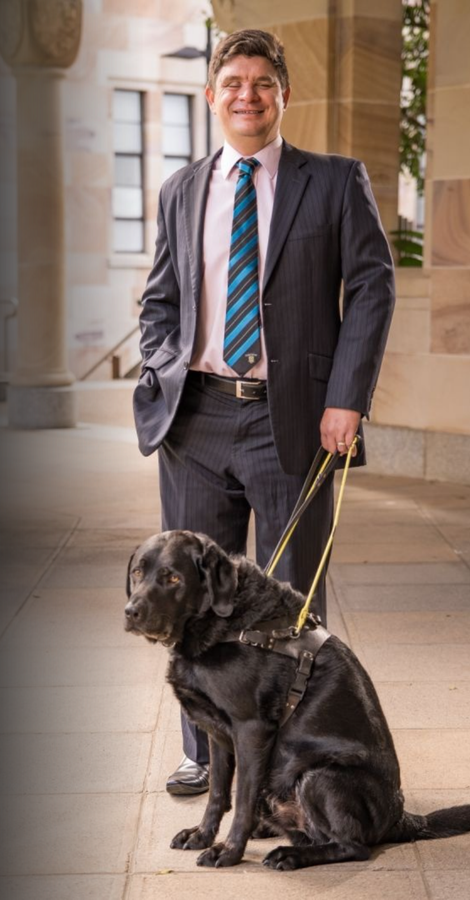
Is it accessible?
Assistive AV Control, an industry first
Innomesh Assistive AV Control began with Professor Paul Harpur at the University of Queensland. People who are blind or have low vision can take control of a teaching room on their own, from their own phone with Apple VoiceOver or Android TalkBack, without having to disclose anything. It is in use at universities across the world.
Innomesh answers every one of these questions in one platform under three subscriptions.
07 · meshIQ
How is AI used in AV control systems?
meshIQ is the AI layer across Innomesh, and it is in production. Your team asks questions about the estate in plain language, such as which sources people use most or how people move through the busiest room, and meshIQ answers with the dashboard best suited to the question. Any dashboard can be saved and shared.
Diagnosis. When an alert fires, meshIQ diagnoses it with the full history of the room: live device data, alert history, engineer notes, linked tickets, past outages and the last configuration change. It gives the likely root cause, what the fault affects and how to recover, then proposes the fix and runs it once you confirm.
Log analysis. Ask what is wrong with a device and, once you confirm, meshIQ downloads its log, reads the last few days and compares them with the rest of your fleet. It flags new errors and crashes, shows the log lines behind each one, and says when the logs can't pin down the cause.
Governed actions. meshIQ also acts in chat: asset actions on up to 25 devices from one confirmation, scheduled actions and automation policies. Every action is confirmed by the user, and every answer and action stays within the sites and permissions their role allows.
AI in AV is only as useful as the context it can see. Because Innomesh runs the control layer, it sees how people use each room as well as how each device is performing. To see why that matters, read our blog Why AV control systems need a managed application layer.
meshIQ · in production
You talk to your data and it responds to you in dashboards.
Show me the user interaction journey for the busiest room over the last 30 days
User interaction journey · busiest room · 30 days
Source switching and volume adjustments are the top flows in this room.
FAQ
Frequently asked questions about AV control systems
AV control systems explained
An AV control system is the software and hardware that lets people run every device in a room from one interface. It powers equipment on and off, switches sources, manages audio, cameras and video conferencing, and runs automation. Innomesh is an AV control system delivered from the cloud, so every room in an organisation runs the same way and is managed from one portal.
An AV system is the audio visual equipment in a space that lets people see, hear and share content: displays or projectors, speakers, microphones, cameras, switchers and the control system that ties them together. In an enterprise, AV systems sit in meeting rooms, lecture theatres and boardrooms, and Innomesh manages them across every room and brand.
An AV system is the equipment in a space; the AV control system is the layer that makes it work together. Displays, speakers, microphones, cameras and switchers form the AV system. The control system gives people one interface to run them and gives your support team one place to manage them. Innomesh provides that control layer across every room and every brand.
An AV system controller is the device or service that sends commands to each piece of AV equipment and reads back its state. Traditionally it is a control processor in the rack of every room, running a program written for that room. With Innomesh, the controller's job runs in the cloud, so no room depends on its own uniquely programmed box.
AV room control is how people operate the technology in one space: the touch panel, the source buttons, the volume and the camera. Good room control gives every user the same experience in every room. Innomesh delivers room control from the cloud, with one interface across meeting rooms, conference rooms, lecture theatres and boardrooms, on any touch panel or the user's own device.
An AV control room is an operations space, such as a network, security or emergency operations centre, where operators watch live information on video walls and desk displays around the clock. AV control decides what each screen shows and lets operators switch layouts and sources as events unfold. Innomesh controls control rooms and operations centres from the same platform as meeting rooms and lecture theatres.
A simulation lab control room is the room beside a simulation lab, usually behind one-way glass, where educators run the scenario, watch the cameras and talk to learners. Its AV controls the cameras, microphones, displays and audio in both rooms. Innomesh controls the simulation room and its control room on the same platform as lecture theatres and meeting rooms, so support works the same way everywhere.
Yes, Innomesh runs simulation rooms, clinical skills labs, wet and dry teaching labs and lecture theatres from one platform, with one interface and one support model. Simulation pods can each run their own scenario with their own AV, and the recording and debrief system you already use keeps its role alongside it.
AV control system software is the application that decides what happens in a room when someone uses it. In traditional systems it is written separately for each controller and managed room by room. Innomesh delivers AV control software with a SaaS platform around it, which manages it across every room: rooms are configured from templates, updated centrally and kept current as part of the subscription.
AV control and AV monitoring are different jobs: AV control runs the room, while AV monitoring watches it. Control decides what happens when someone presses a button; monitoring tracks device health, raises alerts and reports usage. A monitoring tool on its own can see a fault but cannot change the control application behind it. Innomesh does both from one platform.
Choosing an AV control system
The three main types of AV control systems are hardware control processors programmed room by room, server-hosted control running in your own data centre, and cloud-native AV control delivered as SaaS, which is how Innomesh works. The first two keep a custom program for every room; the third configures rooms from templates and manages them centrally.
Cloud-based AV control runs the logic for each room from the cloud instead of from a processor in the room. The touch panel becomes an interface into a managed service, and changes are made once and rolled out across the estate. Innomesh is a cloud-native AV control platform in which every room runs its own separate copy of the room’s AV application, so no room can interfere with another and a fault in one room never spreads to the next.
The best AV control system for an enterprise controls hardware from any manufacturer, manages every room from a single platform, monitors as well as controls, connects to the service desk, secures the estate, is accessible to every user and turns room data into decisions. Innomesh does all of this in one cloud-native platform across 100+ manufacturers, and won Control and Management Technology of the Year at the AV Awards 2026.
Yes, a device-agnostic AV control system such as Innomesh controls equipment from many manufacturers through one interface. Innomesh works with Crestron, Extron, AMX, Q-SYS, Biamp, Shure, Lightware, Kramer, Panasonic, Epson, NEC, LG and 100+ more manufacturers, so you can choose hardware on merit and change suppliers when you need to.
Yes, Innomesh brings Microsoft Teams Rooms and Zoom Rooms into the same platform as the rest of the room, so their device health, peripherals and restarts sit alongside control of the displays, cameras and audio. The Innomesh room interface can also run inside Zoom Rooms, so people use one panel for the whole room.
Cloud-based AV control from Innomesh replaces custom programming with configuration: each room type is defined once as a template and every room of that type inherits it. Changes roll out from the portal without a site visit or new code, and MarketSpace shares production-proven room designs between member institutions.
Yes, cloud-based AV control systems such as Innomesh are secure. Innomate is SOC 2 Type 2 certified, and Innomesh protects your AV estate as well as itself: policies apply the secure settings you choose to the devices it manages and correct drift when it happens. Single sign-on, role-based access control and per-tenant isolation come as standard, control data travels over a site-to-site VPN or high-speed fibre connection to your dedicated private cloud, and audio and video stay on your local network.
Moving to cloud AV control
Yes, Innomesh moves rooms to cloud-based AV control on the devices you already own, from 100+ manufacturers, so there is no rip and replace. Each device keeps running until it actually fails, which extends hardware life by 5+ years and spreads refresh spending over time.
Innomesh runs on any HTML5-capable touch panel and on selected proprietary touch panels such as Crestron, AMX and Extron, so most organisations keep many of their existing panels. Queensland University of Technology kept its existing touch panels and controllers in service when it moved to Innomesh. People can also control the room from their own phone or laptop in the browser.
If the connection to the cloud drops, an Innomesh room keeps its audio and video running on the local network, so a presentation already in progress carries on; what pauses is control from the touch panel until the connection returns. Drops like this are extremely rare: the Innomesh architecture and the way it connects to your network keep it highly available, with 99.99% uptime over 8+ years. The failure mode is graceful loss of control, not loss of the room. Innomesh also offers a local failover controller for rooms that must keep full control through an outage.
It depends on whether you are adding monitoring and management or moving control. Monitoring and management, on the Innomesh Pulse and Sight subscriptions, connect to the devices already in your rooms and can cover thousands of rooms within weeks. AV control is more intimate: it changes what happens when someone presses a button, so each room type is designed, tested and rolled out with care. Even so, moving rooms to cloud AV control takes months rather than years. Queensland University of Technology had 750 rooms monitored and managed within weeks, then moved them to full AV control from the cloud in 4 months on the Innomesh Space subscription. Many organisations start with monitoring and management and move rooms to full control over time.
The cost of an AV control system depends on how it is delivered, and cloud-based AV control is cheaper than a traditional AV control system, for three reasons. You don't buy a control processor for every room, because the room's logic runs in the cloud. You can use any HTML5-capable touch panel, not only an expensive branded one, and keep your existing panels, including selected proprietary Crestron, AMX and Extron panels. And you don't pay for custom programming: rooms are configured from templates as part of the platform, and updates and ongoing support for years to come are included in the subscription.
Compare the Innomesh subscriptions Request enterprise pricing
About Innomesh
Cloud-based AV control from Innomesh is built for high availability and has delivered 99.99% uptime for over 8 years in production. Each room runs separately in the cloud, so a fault in one room never spreads to another, and audio and video stay on the local network. Innomesh manages 100,000+ devices for 25+ enterprise customers, with 100% customer retention over 8 years.
meshIQ is the AI layer across Innomesh, in production and free for every customer to try. Your team asks questions about its AV estate in plain language and gets the answer as a dashboard it can save and share. When an alert fires, meshIQ diagnoses it with the full history of the room and proposes the fix, and it can download and analyse a device’s logs to find the root cause. It takes governed actions in chat, such as asset actions on up to 25 devices at once, scheduled actions and automation policies, each confirmed by the user and limited to the sites and permissions their role allows. Through the meshIQ MCP server, AI tools your team already uses, such as Claude and Microsoft Copilot, can query your Innomesh estate too.
Yes, Innomesh Assistive AV Control lets people who are blind or have low vision run a teaching room on their own, from their own phone, using Apple VoiceOver or Android TalkBack. It began with Professor Paul Harpur at the University of Queensland, is an industry first and is in use at universities across the world.
Explore Innomesh
- The Innomesh platform
- Subscriptions: Pulse, Sight and Space
- Cloud-based AV control with Innomesh
- AV monitoring for every room
- Enterprise AV management
- AV remote monitoring and management explained
- Why AV control systems need a managed application layer
- University of Aberdeen case study
- Innomesh wins at the AV Awards 2026